Apple Music is widely used in Nigeria for streaming local and international songs, checking the Apple Top 100 Nigeria, and accessing personalized playlists. However, many users still struggle with Apple Music login, especially when switching devices, setting up an Apple ID for the first time, or dealing with region and payment-related issues.
This guide explains how to log in to Apple Music in Nigeria step by step on the web, iPhone, Android, Windows, and Mac. It also clears common confusion around Apple ID, iCloud, Replay, and login problems that affect Nigerian users.
What You Need Before You Log In (Important for Nigerians)
Before attempting Apple Music login, there are a few essentials you must have in place. Missing any of these often leads to repeated errors.
First, you need an Apple ID account. Your Apple ID is the single account used for Apple Music, iCloud, App Store, and other Apple services. When people search for my Apple ID, they are usually trying to confirm whether they already have one or need to create it.
Second, ensure you have a stable internet connection. Poor network quality can interrupt Apple ID verification, especially during two-factor authentication.

Third, confirm your country and region settings. For Nigerian users, your Apple ID country should be set correctly to avoid Apple Music region issues. Incorrect settings can cause Apple Music not to open or request repeated sign-ins.
Finally, payment setup matters. Many Nigerian users encounter issues during login or setup because Apple Music tries to confirm subscription status. Nigerian debit cards often fail at this stage, which is why using a reliable alternative like a virtual dollar card is recommended for smooth Apple services.
Apple Music Explore: Everything You Need to Know About Apple Music SubscriptionHow to Log In to Apple Music (All Working Methods)
Apple Music allows you to log in across multiple devices. Below are the correct steps for each platform Nigerians commonly use.
1. Apple Music Login on Web
The Apple Music login web option is useful if you’re using a browser on your phone, tablet, or computer.
Steps:
- Open your browser and visit Apple Music
- Click Sign In at the top-right corner
- Enter your Apple ID email
- Type your password
- Complete two-factor authentication if prompted
Once signed in, you can stream music, view playlists, and access charts directly from the browser.
2. Apple Music Login on iPhone or iPad
For iPhone and iPad users, Apple Music is deeply integrated into iOS.
Steps:
- Open the Apple Music app
- Tap Sign In
- Enter your Apple ID (this is your Apple ID sign-in)
- Verify your account using the code sent to your device or number
Your Apple ID account will automatically sync across other Apple apps on the device.
3. Apple Music Login on Android
Many Nigerians use Android phones and still enjoy Apple Music without issues.
Steps:
- Download Apple Music from the Google Play Store
- Open the app and tap Sign In
- Enter your Apple ID details
- Complete verification
Apple Music on Android offers the same playlists, downloads, and charts as iOS, making it a strong option for Apple Music Nigeria users on non-Apple devices.
4. Apple Music Login on Windows PC
Windows users can log in using either iTunes or the web player.
Steps:
- Open iTunes or visit music.apple.com
- Click Sign In
- Enter your Apple ID and password
- Verify with two-factor authentication
This method is ideal for users who listen while working or studying.
5. Apple Music Login on Mac
On Mac devices, Apple Music is built into macOS.
Steps:
- Open the Music app
- Click Account → Sign In
- Enter your Apple ID
- Verify
Your library and playlists sync automatically across all Apple devices.
How to Create an Apple ID in Nigeria (If You Don’t Have One)
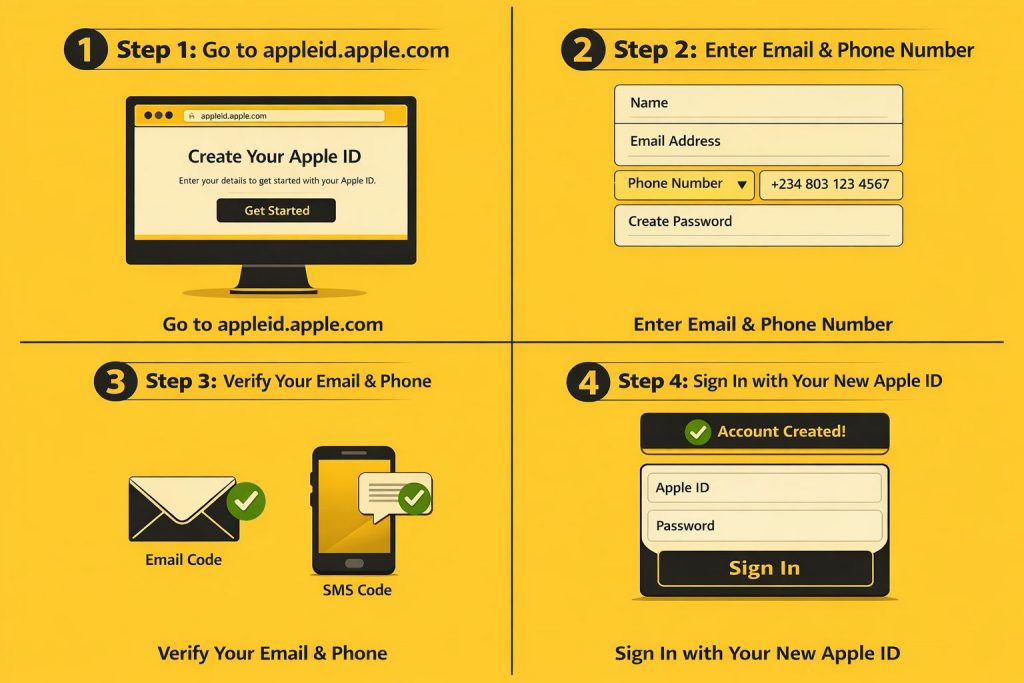
If you don’t have an Apple ID, you must create one before using Apple Music.
Steps:
- Visit Apple to get started
- Enter your email address and phone number
- Create a password
- Verify your email and phone number
- Sign in using your new Apple ID
Once created, your Apple ID works for Apple Music, App Store, and iCloud.
Common Apple Music Login Problems in Nigeria (and Fixes)
Many Nigerian users experience login issues due to region, verification, or payment problems.
1. Your Apple ID Has Not Been Used Before
This happens when Apple requires you to complete account setup.
Fix:
- Sign in to your Apple ID dashboard
- Review your Apple ID account details
- Add a valid payment method
Using a virtual dollar card helps bypass card restrictions that cause setup failures.
2. Two-Factor Authentication Not Receiving Code
This is common with Nigerian numbers.
Fix:
- Confirm your phone number is correct
- Check your network signal
- Ensure iCloud settings allow verification messages
3. Apple Music Not Opening or Asking You to Subscribe Again
This usually means your subscription renewal failed.
Fix:
- Update your payment method
- Avoid unstable debit cards
- Use a reliable virtual dollar card to prevent recurring issues
4. Device Login Limit Reached
Apple limits the number of devices connected to one Apple ID.
Fix:
- Sign in to your Apple ID
- Remove unused devices from your account dashboard
Apple Music Login Features Nigerians Should Know About
Logging in gives you access to features many users don’t fully explore.
1. Apple Music Replay
Apple Music Replay, also known as Replay Apple Music or Apple Replay, displays your most-played songs and artists for the year.
How to access:
- Visit Apple Replay
- Sign in with your Apple ID
- View your listening stats
This feature is popular among Nigerian users who want to track their music habits.
2. Apple Music Top 100 Nigeria
The top 100 Nigeria Apple Music chart highlights the most-streamed songs in Nigeria.
How to access:
- Open Apple Music
- Go to Browse or Search
- Select Apple Music Top 100 Nigeria
It’s a great way to discover trending local music.
Frequently Asked Questions
1. How can I log into Apple Music without a subscription?
You can sign in with your Apple ID and browse music, but streaming requires an active subscription.
2. Why can’t Apple verify my phone number?
Network issues or incorrect country codes often cause this issue. Double-check your number and retry.
3. Can I use Apple Music on Android?
Yes. Apple Music works fully on Android devices. Download Apple Music from the Google Playstore. Log in and enjoy unlimited music.
4. Why is Apple Music asking me to subscribe again?
Your current payment method may have failed due to insufficient funds, incompatibility, or expiration. Update it to restore access.
5. How do I reset my Apple ID password?
Go to appleid.apple.com and choose “Forgot password.” Follow the steps and input a new password.
Conclusion
Logging into Apple Music in Nigeria is simple once your Apple ID, region, and payment setup are correct. Whether you’re using a web browser, iPhone, Android, Windows, or Mac, following the right steps prevents common errors and interruptions.
For uninterrupted access, smooth renewals, and fewer login issues, Nigerians benefit from using a reliable payment method, such as SnappyPay’s virtual dollar card. With the right setup, you can enjoy Apple Music, Replay, and the Top 100 Nigeria charts without stress.